
Your Shopify Catalog Is the Foundation Everything Else Runs On

TLDR
  • Your Shopify catalog is the data layer everything else in your store runs on.
  • A clean catalog means customers find products, promotions apply correctly, and your data reflects reality.
  • A messy one means broken filters, wrong collections, promotions that apply to half of what they should, and reports you can’t trust.
  • Single-brand stores have a discipline problem. Multi-brand retailers have a systems problem.
  • The work pays back in discovery, conversion, and scale every day your store is live.

Most merchants treat catalog quality as a maintenance task, something to get to eventually, between launches, when there’s time. Your catalog isn’t a filing system sitting quietly in the background. It’s the data layer that search, filtering, collections, promotions, reporting, and every third-party app in your stack runs on. When it’s inconsistent, all of those things are unreliable, and the failures show up downstream in ways that are hard to trace back to the source.

A well-structured catalog pays back every time a customer finds what they’re looking for, every time a promotion applies to everything it should, every time a report actually reflects what’s happening in the business. That’s not a one-time benefit. It’s the baseline your store operates from.

What a clean catalog actually buys you

The most direct payoff is discoverability. Shopify’s storefront search runs on product titles, tags, and product types. If those fields are inconsistent: tags in different cases, product types that vary by whoever entered the product, titles that follow no particular structure, search returns unreliable results and filters show duplicates or gaps. Customers who can’t find what they’re looking for don’t contact support. They go somewhere else.

Collections and promotions are where the cost becomes visible in revenue. A smart collection built on a tag only pulls the products where that exact tag value exists. A discount rule targeting a product type only applies where that product type is spelled and cased exactly right. These aren’t edge cases. They’re standard Shopify behavior. A messy catalog means promotions are quietly applying to 60% of what they should, and the gap is invisible until a customer notices or you run a reconciliation.

Reporting is the quietest casualty. Inconsistent product types make sales-by-category reports noise. Four different spellings of the same vendor name mean filtering by vendor gives partial data. Decisions made on those numbers aren’t wrong in obvious ways. They’re miscalibrated in ways that compound over time.

Every tool in your stack that personalizes recommendations, powers search, or automates merchandising learns from your catalog data. Feed it inconsistent data and it produces worse results. The app works correctly. It’s the inputs that are wrong.

The discipline problem versus the systems problem

For a single-brand merchant, catalog quality is a discipline problem. One product structure, one vendor, one set of conventions. The challenge is applying them consistently as products get added quickly, as the team grows, as campaigns create temporary tags that never get cleaned up. Clear standards, applied consistently, get you most of the way there without a lot of infrastructure.

For a multi-brand retailer, it’s a systems problem of a different order. Every vendor has their own title structure, their own tagging logic, their own idea of what a product type is. A pet goods store carrying forty brands receives forty different product data formats and has to normalize all of them into one coherent catalog. A pop culture merchandise store carrying licensed products from dozens of IP holders has the same challenge. The catalog debt compounds with every new vendor, and without a system for normalizing incoming data, you’re always behind.

The stakes scale accordingly. For a single-brand store, a messy catalog is an inefficiency. For a multi-brand retailer, it’s a structural problem that affects every layer of the business: what customers can find, which promotions work, what the data actually says. The mechanics of what breaks and how to audit it are covered in depth here.

How catalog quality connects to search and AI discovery

Google’s product search depends on structured, consistent product data to index and surface your products correctly. Inconsistent product types send mixed category signals. Titles written for internal conventions rather than how people search lose impression share. Missing or incorrect GTINs mean your products compete poorly against other retailers listing the same item with clean data.

At Google Marketing Live earlier this month, Google announced AI agents that can complete purchases on behalf of users. Those agents navigate stores by reading product data, and a messy catalog is exactly what they can’t parse. What that shift means for merchants is worth understanding in full, but the catalog implication is direct: structured data isn’t just good housekeeping anymore.

Why this work keeps getting skipped and what it actually returns

Catalog work gets deprioritized because the cost of a messy catalog is distributed and invisible, while the work of fixing it is concentrated and visible. That framing has it backwards. The distributed cost is real and it’s ongoing. It shows up as conversion rate underperformance you can’t explain, promotions that require customer service recovery, and reports you’ve quietly stopped trusting.

Customers who find what they’re looking for convert. Promotions that apply correctly don’t generate exceptions. Reports that reflect reality support better decisions about inventory, pricing, and what to stock next. Apps that learn from clean data make better recommendations. A catalog structured for search is one that Google and AI shopping tools can index and surface accurately. None of that shows up as a single line item, but all of it is measurable if you look at the right things.

Catalog audits and product onboarding are two of the tasks I’ve handed to Claude across my stores, including the multi-brand catalogs where this problem is most acute.

RelatedThe Shopify Tasks I’ve Handed to Claude (And the Ones I Haven’t)The catalog work that used to pile up is now something I hand off to Claude and review rather than build from scratch. Here's what that actually took.

Pull up your storefront filter and search your best-selling category. Does every option show exactly the products it should? Are there duplicates, missing options, or results that don’t belong?

What’s the thing in your store that keeps behaving strangely that you haven’t traced back to the catalog yet?

The Shopify Tasks I’ve Handed to Claude (And the Ones I Haven’t)

TLDR
  • Setting up new products used to take most of a day, sometimes more depending on how many came in at once.
  • Claude handles the repetitive parts well: titles, tags, collections, menus, in the right order.
  • It can’t figure out your rules on its own. You have to encode them first.
  • You don’t need years of systems in place to start. One rule, one product type, is enough.
  • What you get on the other side is an operator who never forgets what you told it.

Setting up a new product used to be an all-day job, sometimes longer depending on how many new SKUs came in at once. Optimize the title, map to the right tags and product type, create the collection if it doesn’t exist, wire it into the right menus, check that every attribute follows the vendor’s conventions. With ten new products from two different vendors, that work spills into the next morning and products sit unpublished while the backlog grows.

I run stores with very different catalogs: dog goods and accessories, and pop culture merchandise. They’re all mine, run at different times, and each has its own vendors, naming conventions, and rules for nearly everything. The catalog work that used to pile up is now something I hand off to Claude and review rather than build from scratch. But it took more setup than I expected, and it’s worth being honest about what that setup actually involves.

What made it possible was Claude Code and the ability to build a custom MCP (Model Context Protocol) server: a direct connection between Claude and the store’s Admin API. I built mine before Shopify launched their official connector, and it has capabilities that connector doesn’t: full catalog scanning without hitting token limits, tag dependency checking across smart collections before any changes are made, theme file searching to catch hardcoded references, metafield and metaobject read/write, sales data access, and a built-in dry-run mode so nothing gets committed without explicit approval. Other AI tools I tried couldn’t parse large product exports accurately or connect to Shopify at all. Everything was copy-paste, which defeats the point when you’re trying to operate at scale.

What Claude actually handles in my Shopify store

Product onboarding is the clearest win. New product comes in, I run it through the workflow: title gets structured correctly, tags get mapped to the standardized set, product type gets assigned, collection gets created or the product gets added to the right existing one, menu placement gets handled. What used to eat most of a day now takes a fraction of it, and the product goes live without sitting in a queue.

Order operations is the other area. I built an internal platform to track orders across one of my stores, and getting Claude to read order status correctly required getting specific about definitions. What does “fulfilled” mean in this store’s workflow? What counts as pending? Those aren’t obvious answers, and Claude can’t infer them from context. Once they’re defined and documented, it handles them correctly every time.

Catalog audits are where it genuinely surprises me. Spotting inconsistencies across a large catalog: products where the title doesn’t follow the right structure, tags that don’t match the standardized set, attributes that conflict. That’s tedious work I used to do manually in batches. Claude can scan the whole catalog and surface the issues faster than I can scroll through a spreadsheet.

RelatedYour Shopify Catalog Is the Foundation Everything Else Runs OnYour Shopify catalog is the data layer that search, collections, promotions, and every app in your stack runs on. When it's inconsistent, everything downstream is unreliable.

Why I never let Claude touch the store without a checkpoint

This isn’t a one-prompt operation. I run it with checkpoints built in. Before anything gets written to the store, I review the plan. Before a bulk update runs, I spot-check a sample of the output. There are approval steps before anything commits. The write guards in the MCP reinforce this too: dry-run is the default, and writes require explicit sign-off. The goal is to move faster without losing control of what’s actually happening in the store.

Matrixify is part of how this works in practice. When Claude prepares a bulk update, it formats the output as a Matrixify-ready spreadsheet. That file is the checkpoint. A spreadsheet is easy to review, easy to spot-check, and easy to understand at a glance before anything goes live. Once I sign off, it uploads to Matrixify and the changes execute. The format isn’t just a technical requirement. It makes the review step something you can actually do.

The first few passes with a new vendor or product type reveal gaps in what I explained, not failures in Claude. When an output is wrong, it’s almost always because I didn’t account for something in the rules I gave it. That’s useful feedback. It forces you to make your own logic explicit in a way that running on instinct never does.

What you have to teach Claude before it’s useful

None of this worked out of the box. The product title structure I use isn’t arbitrary: there are rules per vendor, rules per product type, edge cases learned from years of managing these catalogs. I can’t tell Claude to “optimize product titles” and expect it to know what I mean. I have to explain the structure, give examples, explain why the rules exist, and document the exceptions.

The same is true for tags. My tag taxonomy is standardized across stores with very different product types. Claude doesn’t know that taxonomy. I had to build it out, explain the mapping logic, and make sure the patterns were clear enough that it could apply them consistently to products it had never seen.

How my old Shopify SOPs became Claude’s training material

I’d already done a version of the groundwork before Claude was part of the picture.

Years of bulk importing and updating products through tools like Matrixify forces you to think in systems. Every time I mapped a new vendor’s catalog to my store’s structure, I had to make decisions: what does this product title become, which tags apply, what product type does this map to. Do that enough times and you start writing it down, not because you’re building infrastructure, but because you can only hold so much in your head. The result was a set of mini SOPs. Practical notes to my future self: here’s how vendor X structures their titles, here’s the mapping logic, here’s what to watch for.

I’d also built out the underlying frameworks those SOPs mapped to. A tag taxonomy with real logic behind it. A product type hierarchy I’d designed deliberately, thinking about SEO, storefront filter conditions, and how customers actually navigate a catalog. I’ve been doing SEO since 2007, and those fundamentals shaped how I structured everything long before AI was part of the workflow.

When I started using Claude for catalog work, those frameworks became the training material. I wasn’t asking it to invent structure. I was handing it structure that already existed and asking it to apply it consistently at scale.

Claude also pressure-tested what I’d built. Once it was running catalog work through my rules, it surfaced patterns I hadn’t explicitly documented: vendor quirks I knew intuitively but hadn’t written down, edge cases that fell between two rules. Some confirmed the logic I already had. Some prompted me to go back and tighten it. The frameworks I have now are more precise than the ones I started with, partly because explaining them to Claude forced me to make the implicit explicit.

How to start using Claude for Shopify ops today

You don’t need the same foundation in place to get going. The SOPs I handed Claude were built one vendor at a time, one problem at a time.

Pick your best-selling product type. Write down how a title should be structured for it and explain why. That’s one rule. Give it to Claude and ask it to apply that rule to a product that doesn’t currently follow it. The gaps in your explanation become the next rule. You build it forward from there, the same way I did, just with Claude in the loop from the start instead of added later.

The starting point is one thing you know well enough to write down. Most merchants already know more than they’ve documented.

The Shopify decisions I still make myself

Anything that requires judgment about the business: what to stock, how to price it, which vendor relationships are worth maintaining, what a customer complaint is actually telling me. Claude is good at applying rules consistently at scale. It’s not good at deciding what the rules should be.

The setup itself is also still on me. Encoding your catalog logic, your operational definitions, your store-specific conventions takes real work. It’s not a one-time cost either, because the rules evolve and the memory needs to stay current. But it compounds. Every hour spent making the rules clearer pays back every time a product gets processed correctly without your hands on it.

Claude does what you encode. If you’ve encoded your actual rules, it works well. If you haven’t, you get generic output that doesn’t fit how your store actually runs.


The Hidden Cost of a Messy Product Catalog

TLDR
  • A disorganized catalog is an operational debt problem, not an admin problem
  • Tags, metafields, collections, and variants accumulate without a system and the damage compounds as you scale
  • Search, filtering, and merchandising all depend on catalog structure being intentional
  • Most merchants do the audit after something breaks, not before

Your product catalog is not just a list of things you sell. It is the data layer that everything else in your store runs on: search, filtering, collections, promotions, reports, third-party apps. When that data layer is inconsistent, everything built on top of it is unreliable, and the problems surface in places that feel unrelated to the catalog itself.

How catalog debt accumulates

No merchant sits down and decides to make their catalog a mess. It happens one product at a time, over months or years, by people making locally reasonable decisions without a shared system.

Tags are the classic example. The first person to tag a product used lowercase. The next used title case. Someone copied a tag from a supplier spreadsheet and it came in as “colour” instead of “color.” A seasonal campaign needed a new tag and nobody cleaned it up after the sale ended. Now your tag list has “blue,” “Blue,” “navy blue,” “Navy,” and “ocean blue” for what is functionally the same attribute. Because Shopify treats these as distinct values, a customer filtering by “Blue” misses every product tagged “blue” or “navy blue.”

Collections follow the same pattern. A new one gets created whenever someone needs it, with no consistent naming convention, no rules about what belongs in it, and no review of whether a collection already exists that covers the same products.

Variant structure accumulates differently but causes more damage. The first 50 products had two options: size and color. Then a product came in that needed a third option. Someone made it work by cramming the third attribute into an existing option field, or by creating a separate product listing. Do that enough times and you have a category where some products have one variant structure and others have a different one.

Metafields are the quietest offender. Added for a feature, a campaign, or a developer request, then left in place indefinitely. The data goes stale. The app that used it gets uninstalled. Nobody knows what the field was for.

How to build a taxonomy that holds up

The right structure starts broad and expands only when the volume of products justifies it. A store with thirty products does not need sub-categories. A store with three hundred might. The mistake is either starting too granular, creating narrow categories before you have enough products to fill them, or never expanding at all, so everything ends up in a handful of buckets that stop being useful as the catalog grows.

The framework: start with your top-level product types, the widest honest groupings. Then add a second level only when a category has enough distinct products that a customer browsing it would benefit from narrowing down. Depth beyond two levels is rarely worth the maintenance cost unless you are running a very large catalog with genuinely distinct sub-segments at each level.

If you are not sure where to start, look at how large retailers in your category organize their catalogs. A brand like REI, ASOS, or Wayfair (depending on your category) has spent significant resources solving the same problem at scale. Their navigation structure, filter options, and product type naming are worth studying before you build your own. You are not copying their catalog, you are learning what a mature version of your category looks like so your structure can grow into it rather than away from it.

The same logic applies to tags and metafields. Define the attributes that matter for filtering and search in your category, name them once, and apply them consistently. A tag taxonomy document, even a simple spreadsheet with approved values for each attribute, is worth more than it sounds when you are onboarding a new person or importing products from a supplier.

What breaks when your catalog is disorganized

The damage is concrete and shows up in places that feel unrelated to the catalog itself.

Storefront filtering. Shopify’s native filtering runs on product tags and metafields. Inconsistent tag values mean inconsistent filter options: your color filter shows “blue,” “Blue,” and “navy blue” as three separate entries, and customers who pick one miss everything filed under the others. The filter looks complete. The results are not.

Search. Shopify search matches on title, tags, and product type. Inconsistent tagging means inconsistent results. A customer searching “linen” finds some products and misses others because half your linen products are tagged and the other half were entered by someone who assumed the word in the title was enough. It is not.

Merchandising and automation. Apps that sort collections, run promotions, or build recommendation logic depend on your catalog data being consistent. A promotion rule for “all products tagged clearance” does nothing for the products where someone used “Clearance,” “on-sale,” or “sale” instead. The rule ran. The discount did not apply. You found out from a customer.

Reports. If your product types are inconsistent, your sales-by-product-type report is noise. If your vendor field has four different spellings of the same brand name, filtering by vendor gives you partial data. These are not reporting problems. They are catalog problems that show up in reports.

Bulk operations. Editing at scale through Shopify admin, Matrixify, or any bulk tool is painful when the source data is not consistent. You cannot filter for what you cannot reliably identify. A cleanup job that should take an afternoon turns into a two-day archaeology project.

Your Google product feed. Shopify’s Google channel pulls product data directly from your catalog: title, description, product type, vendor, condition, GTIN, and any custom labels you have mapped. If your product types are inconsistent, Google gets inconsistent category signals and your products end up misclassified in Shopping results. If your titles are written for your internal naming convention rather than how people search, your impression share drops. If GTINs are missing or wrong, products either get flagged in Merchant Center or compete poorly against listings from other retailers selling the same item with correct data. Custom labels, which let you segment campaigns by margin, season, or clearance status, only work if the underlying tag or metafield structure is clean enough to map reliably. A messy catalog does not just hurt your store. It hurts your paid search performance directly.

The variant problem specifically

Variant structure is the hardest catalog problem to fix after the fact, because changing it usually means creating new products, migrating historical order data, and updating anything that references the old structure by ID.

Merchants typically set up a sensible two-option structure at launch: size and color. Then a product arrives that needs a third option. Shopify allows up to three variant options per product. If the first two are already taken, the choices are: add a third option and restructure, cram the attribute somewhere it does not belong, or create a separate product. All three of those choices create problems at scale.

Over time, a category ends up with products that have different option structures. Some have Size/Color. Some have Size/Color/Material. Some have Size/Finish because a different person set them up. Filtering across that category requires the options to be consistent. Apps that read variant data assume a structure and get confused when it is not there. Bulk editing becomes a product-by-product exercise because you cannot apply one template to all of them.

The time to decide variant structure is before you load the catalog, not after.

When to do the audit

The trigger is usually something breaking: a filter that returns wrong results, a promotion that does not apply correctly, a developer asking for clean product data and finding there is none. By that point, the debt has been accumulating for a while.

The better time is before a scaling event: before adding a large batch of new SKUs, before going wholesale, before launching a new market or sales channel, before adding an app that depends on catalog structure being consistent. Doing the audit at that point costs less than doing it after the new products are in, the app is installed, and the inconsistencies are compounded.

What the audit involves: standardizing your tag taxonomy (pick one casing convention, pick one spelling, retire tags that no longer mean anything), cleaning up vendor and product type fields so they are consistent enough to filter and report on, deciding variant structure by category and applying it consistently, and reviewing metafields to remove anything stale or unused.

None of this is complicated. It is just work that feels lower priority than the next launch until something downstream breaks because of it.

Where to start

Pull your product list with tags exported to a spreadsheet and look at your 20 most common tags. If you see duplicates, casing inconsistencies, or tags that clearly refer to a campaign that ended two years ago, that is where the debt is. Standardize those first, apply the same logic to vendor and product type fields, and the rest of the cleanup becomes a matter of working category by category with a consistent ruleset in hand.

How to Actually Evaluate a Shopify App Before You Install It

TLDR
  • Star ratings tell you the least useful thing about an app.
  • The signals that actually matter are around the developer, not the product listing.
  • Red flags a non-developer can spot are visible before you install anything.
  • New apps with low review counts are not automatically bad — context is everything.
  • What a trustworthy early-stage app looks like vs. one that just hasn’t failed anyone yet.

The average Shopify merchant has installed and uninstalled more apps than they can remember. A few stuck. Most didn’t. The ones that didn’t were usually spotted too late: after the install, after the store slowed down, after the support ticket that went nowhere for a week. The signals were there before the install. Most merchants just don’t know what to look for — so they look at the star rating, which is the least useful signal of all.

Why star ratings are the least useful signal

A 4.8 is table stakes. Almost every app in the Shopify App Store with more than a few hundred installs sits between 4.5 and 4.9. The range is so compressed that it stops being informative. What got an app to 4.8 matters. When it got there matters. Whether it is still earning that rating or coasting on it matters. The number alone tells you none of that.

Review farms are real. Clusters of five-star reviews posted within days of each other, all using similar language, with no specifics about what the app actually does — these are not organic. Templated reviews that read like they were written from a brief (“easy to use, great support, highly recommend”) are noise. What you are looking for is specificity: a review that names the problem, describes what changed, and mentions something concrete about the experience.

The negative reviews are more useful than the positive ones. Not because they tell you the app is bad, but because they tell you how the developer behaves when something goes wrong. A developer who responds to criticism with blame, deflection, or silence is telling you something important about what support will look like when you need it.

What actually tells you an app is worth installing

Review recency. A 4.8 average with the most recent review fourteen months ago is a different signal than a 4.8 with reviews from last week. An app that has stopped earning new positive reviews has either stopped growing or stopped being good. Check the date on the most recent handful before you read anything else.

How the developer responds to negative reviews. Read every response to a one or two-star review. Are they acknowledging the problem and explaining what changed? Are they defensive? Do they respond at all? This is the clearest window into what working with this developer actually looks like.

Active changelog. An app with a visible, recent changelog is being maintained. Someone is paying attention, shipping improvements, and fixing things that break. An app with no changelog or one that hasn’t been updated in a year is one Shopify update away from breaking silently.

An app with no changelog or one that hasn’t been updated in a year is one Shopify update away from breaking silently.

Named humans. A listing with a real company name, an About page, and identifiable people behind it carries more accountability than one with an anonymous developer handle and a stock photo. You are giving this app access to your store. Know who you are giving it to.

Reachable before you install. Email or message support with a pre-install question before you commit. The response time and quality of that interaction tells you more than any review. If nobody answers before you are a paying customer, they are certainly not going to prioritize you after.

Pricing that makes business sense. A full-featured app at $1.99 a month is either a loss leader, about to raise prices significantly, or not long for this world. Sustainable pricing means the developer can afford to maintain and improve the product. Unsustainably cheap pricing is a risk you are taking on when you build workflows around the app.

Permissions that match what the app does. Read the permission request screen when you install. A discount app that wants access to customer accounts is asking for more than it needs. Permissions beyond the obvious scope of the app’s function are worth questioning before you approve them.

Red flags you can spot without any technical knowledge

  • Five-star reviews posted in clusters on the same dates, all with similar generic language
  • Feature claims in the listing with no screenshots or video actually showing the feature working
  • Pricing structure that requires you to install before the real cost becomes clear
  • No stated support response time, or a support channel that is only a contact form
  • Last app update more than a year ago
  • Broken or generic English throughout the listing combined with stock imagery
  • No privacy policy, or one that is clearly a template not written for this app
  • App store listing that describes what the app does without showing how it does it

The performance check nobody does before installing

Shopify’s Online Store speed report shows you which apps are contributing to your page load time. Check your speed score before you install anything and again after. If a new app drops your score meaningfully, that is a cost you are paying on every page load, on every visit, across your entire store.

The other thing worth Googling before you install: “[app name] uninstall cleanup.” Some apps inject code directly into your theme files. When you uninstall them, that code stays behind unless you manually remove it — and if you do not know it is there, it just sits in your theme doing nothing useful and occasionally breaking things when you update. Newer apps built on Shopify’s Theme App Extension model do not have this problem. Older ones often do. Support can tell you which model they use before you install.

When a low review count is actually fine

Review count is a function of time and install base, not quality. An app that launched six months ago from a developer with a clear track record and 200 installs is not the same risk as an anonymous app with 200 installs and no other signals to evaluate.

The question is not how many reviews the app has. The question is what surrounds the number. A new app is worth a closer look if the developer built it because they ran into the problem themselves, has their name and reputation on it, is reachable before you install, has priced it honestly, and can explain exactly what the app does and does not do. That is a different thing from a new app that just hasn’t had time to disappoint anyone yet.

Early adopters of a well-built new app also get something that users of a larger, established app rarely have: direct access to the person who built it. That access gets harder to maintain as an app scales. Getting in early, when the developer is still talking to every user personally, is a genuinely different support experience.

Why solo-built apps deserve a different standard

A solo developer with their name on an app is accountable for everything in a way that a larger team simply is not. There is no support tier between you and the person who wrote the code. When something breaks, the person who can actually fix it is the person responding to your message.

Solo developers ship fixes faster. There is no sprint planning, no ticket queue, no committee deciding whether your bug is a priority this quarter. A real problem reported on a Tuesday is often resolved by Thursday, because the developer’s entire incentive structure points at keeping users working and happy.

The roadmap of a solo-built app reflects what merchants are actually asking for. A product team at a larger company is making educated guesses about what users need and running them through prioritization frameworks. A solo developer who talks to every user personally knows exactly what is broken and what would make the biggest difference, because they hear it directly.

Solo developers also do not let apps quietly die. A larger company has a portfolio. Apps fall out of priority rotation. A solo developer whose income and reputation depend on the app has every reason to keep it sharp. The pricing is honest because it has to be — no sales team to support, no investor expectations to meet. The price reflects what it costs to build and maintain, and what the value is actually worth.

This is the bar we hold ourselves to with Variant Discounts and Wholesale MarketFlow. Both were built because we ran into the problems they solve — not because we spotted a gap in a market report. One developer, accountable for everything, reachable directly. If you email before you install, you will hear back from the person who built it.

Before you install the next app

Skip the star rating first. Read the negative reviews and watch how the developer responds. Find out who built it and whether you can reach them. Check your store speed before and after. Ask what happens if you uninstall.

The apps worth installing are findable if you know what to look for. The ones that aren’t tend to reveal themselves before they ever get access to your store.

Why Your Conversion Rate Is Lying to You

TLDR
  • Your Shopify conversion rate is calculated correctly and is almost certainly misleading you.
  • The number moves when your traffic mix changes, even if nothing in your store changed at all.
  • Running paid ads attracts bot traffic from countries you do not sell to. It inflates your session count and tanks your CVR without a single real customer having a worse experience.
  • The version of this metric that actually tells you something is segmented: by source, by device, and by country.
  • The funnel breakdown — add-to-cart rate, checkout rate, purchase rate — tells you where buyers are dropping, not just that they are.

Your Shopify conversion rate is not wrong. It is doing exactly what it is supposed to do: counting the percentage of sessions that resulted in a purchase. The problem is that most merchants use it as a measure of how well their store is working, and it is a terrible measure of that.

What Shopify is actually counting

Shopify calculates conversion rate as orders divided by sessions. Sessions include everyone who lands on your store: people who typed your domain directly, people who clicked a cold ad, people who came from a Google search for your brand name, people who landed on the wrong page and left in three seconds, and returning customers who already knew they were buying. They all count as sessions. They all go in the denominator.

When you look at a 2.1% conversion rate, that number is the average outcome across all of those very different visitors, combined into one figure. It tells you what happened. It does not tell you why, or where, or who.

Why your CVR changes when nothing changed

You run a sale and send an email to your list. Your conversion rate spikes. Your store did not suddenly get better. You just sent a pile of warm, high-intent buyers into a denominator that is now weighted toward people who were already planning to purchase.

You launch a cold ad campaign. Your conversion rate drops. Your store did not get worse. You added thousands of sessions from people who had never heard of you, most of whom were not ready to buy on the first visit. Diluting the denominator with cold traffic will drop your aggregate CVR every time, even if the ad is working exactly as it should.

This is the trap. Merchants see the number fall and start looking for what broke. They rewrite copy, change images, move buttons around, run an A/B test on the hero image. None of that is addressing what actually changed, which was the composition of their traffic.

The bot problem nobody warns you about

Running paid ads introduces another variable that most merchants never think to check: invalid traffic. When you launch a Google Ads or Meta campaign, you are not just attracting potential customers. You are also signaling to bot networks, click farms, and scrapers that your store is active and being measured. They follow.

The tell is in your geographic data. Pull your sessions by country and look for spikes from places you do not sell to: China, Russia, Singapore, Thailand, Pakistan, Indonesia. If you are a US-focused store and suddenly 15% of your sessions are coming from Southeast Asia the week after you launched a campaign, that is not organic interest. That is invalid traffic riding in on the back of your ad activity.

This matters for your conversion rate in the most direct way possible: these sessions almost never convert, and they go straight into your denominator. A flood of bot traffic from five countries you do not ship to can cut your reported CVR in half without a single real customer having a worse experience in your store.

If you are not running Cloudflare in front of your store, you are more exposed than you should be. Cloudflare’s free tier blocks a significant volume of known bad traffic before it ever reaches Shopify and registers as a session. It is not a complete solution, but it is the fastest thing you can do to reduce the noise.

Beyond Cloudflare, the cleanup checklist:

  • GA4 filters: exclude sessions from countries you do not sell to. Set up a filtered data stream or use the reporting identity settings to exclude known bot traffic.
  • Google Ads invalid clicks: check your campaign’s invalid click report. Google filters some automatically, but not all. If you are seeing high impression share from unexpected geographies, tighten your location targeting and set bids to “people in or regularly in” your target locations, not “people interested in.”
  • Meta Ads Audience Network: if you are running Meta campaigns with Audience Network placements enabled, disable them. Audience Network is the single largest source of low-quality traffic in most Meta accounts. Turn it off, run for two weeks, check your CVR by placement.
  • Shopify analytics vs. GA4: Shopify counts every session including ones GA4 might filter. If your session counts look dramatically different between the two, the gap is often bot traffic that one platform is catching and the other is not. GA4 with filters applied is generally the cleaner number.

The number that actually tells you something

Segmented conversion rate is a different metric. Slice the same sessions by source and you get a reading for each traffic channel independently: your email CVR, your organic CVR, your paid social CVR, your branded search CVR. These numbers move for different reasons and require different responses.

A drop in email CVR means something is wrong with your email audience, your offer, or your landing page for that segment. A drop in paid social CVR might mean your ad is attracting the wrong audience, or your landing experience is not matching the creative. A drop in branded search CVR is worth investigating carefully, because those are high-intent visitors who already know you.

Device segmentation matters too. A store converting at 3.5% on desktop and 0.9% on mobile does not have a conversion rate problem. It has a mobile experience problem. The aggregate number tells you nothing about that gap.

Where the real diagnostic lives: reading the funnel

The aggregate conversion rate tells you a ratio. The funnel tells you where buyers are actually stopping — and each gap between steps points at a completely different problem.

Sessions → Added to cart

This gap is your product page’s report card. A healthy add-to-cart rate for most stores running filtered, human-only traffic sits somewhere between 5% and 10%, though it varies by category and price point. If yours is below that, the page is not doing enough to get someone to commit to even considering the purchase.

What tends to cause a low add-to-cart rate: unclear value proposition, price shock with no justification, images that do not answer the questions a buyer has before touching the product, missing size or fit information, no trust signals near the buy button. The page answered “what is this” but not “why should I want this.”

Added to cart → Reached checkout

People who add to cart have already decided they want the product. The drop here is almost always caused by something that happens at the cart, not a change of mind about the product itself.

The most common culprits: shipping cost appearing for the first time at cart, forced account creation before checkout, a cart page that is slow or broken on mobile, no visible return policy near the proceed button. This is the step where people pause and ask whether they actually trust you enough to hand over a card number — and if the answer is not obviously yes, they leave.

Reached checkout → Completed checkout

People who reach checkout are serious buyers. A high drop rate here is almost always a friction problem, not a consideration problem.

The most common causes: too many form fields, address validation errors on legitimate addresses, a preferred payment method not available (especially PayPal, Shop Pay, or buy now pay later options for higher-priced items), or a confusing multi-page flow. On mobile specifically, auto-fill failures cause more abandonment than most merchants realize.

This is the step where Shopify’s native checkout tends to outperform custom or third-party checkouts — fewer moving parts, more trust signals, better mobile optimization out of the box. If your Reached checkout to Completed checkout rate is low and you are not running Shopify’s default checkout, that is the first thing to investigate.

How to use the funnel in practice

Find your biggest percentage drop and start there. A 100-visitor funnel that shows 8 adding to cart, 6 reaching checkout, and 3 completing is a checkout problem. The same funnel with 3 adding to cart, 3 reaching checkout, and 3 completing is a product page problem. Same final CVR, completely different fix. The aggregate number would tell you nothing. The funnel tells you exactly where to look.

How to build a clean CVR report in Shopify Analytics

Shopify has everything you need for a clean funnel view built in — most merchants just never configure it. Here is the setup:

  1. Go to Analytics > Reports and open the Conversion rate breakdown report.
  2. Add a filter: Human or bot session = Human. This removes invalid traffic before it touches your numbers. It is the most important filter you can apply.
  3. Add a filter: Session country = [your markets]. If you sell to the US and Canada, set it to those two. This eliminates the geographic noise from countries you will never ship to.
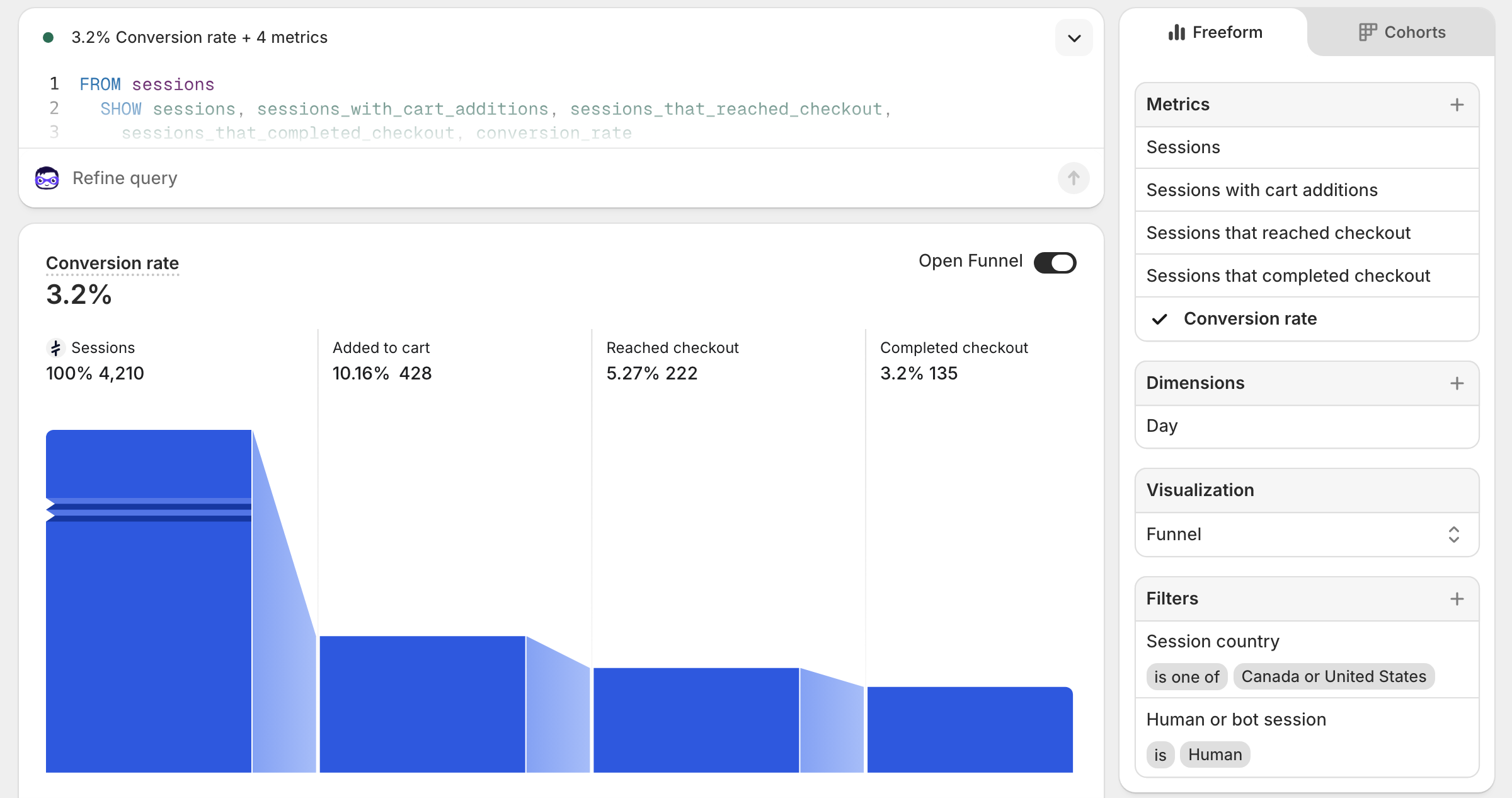
  4. Set the visualization to Funnel. You get the full sequence in one view: Sessions, Added to cart, Reached checkout, Completed checkout, and conversion rate — all filtered to real humans in your actual markets.
  5. Pin it to your dashboard. This is your CVR report now. The number on this report is the one worth tracking week over week.

The funnel view is where the real diagnostic value is. When the drop from Added to cart to Reached checkout is steep, your cart is losing people. When the drop from Reached checkout to Completed checkout is steep, checkout is the problem. Each gap points at a different fix.

Shopify Analytics CVR report filtered by human sessions and target countries, showing funnel breakdown
The Conversion rate breakdown report with bot sessions and out-of-market countries filtered out. The funnel view shows each drop-off step in sequence.

If you are running GA4, it is worth setting up equivalent filters there as well — country exclusions and bot filtering follow the same logic. The Shopify report is the faster setup, but having a second clean source to cross-reference is useful when the numbers start telling different stories.

The metrics worth actually tracking

Aggregate CVR goes on the list of numbers you glance at and do not act on. These are the ones worth building a dashboard around:

  • CVR by traffic source. Email, organic, paid search, paid social, direct — each segment moves independently and breaks for different reasons.
  • CVR by device. Desktop and mobile are different stores from a UX standpoint. A blended number hides which one is dragging.
  • Add-to-cart rate. This is your product page’s job. If it is low, the page is not closing the consideration gap.
  • Checkout initiation rate. The gap between add-to-cart and checkout start is usually cart abandonment: unexpected shipping cost, required account creation, lack of trust signals.
  • Purchase completion rate. The gap between checkout start and purchase is usually a friction problem: too many steps, payment method missing, form errors.
  • Sessions by country. Run this weekly if you are running paid ads. Unexplained spikes from countries you do not sell to are almost always invalid traffic, inflating your session count and depressing your CVR at the same time.

Pull these segmented by source and device, set a 90-day window so you have volume, and look at trends rather than snapshots. A conversion rate that is moving is telling you something. A conversion rate that is flat while traffic doubles is also telling you something. The aggregate number tells you neither.

Shopify Still Can’t Do This: Variant Pricing That Actually Works

__TLDR_MARKER__

Shopify gives you two ways to change what a variant costs: mark it down directly, or create a discount that applies at checkout. They are not the same thing. The built-in discount builder lets you target specific variants, but selecting them requires browsing your catalog and checking boxes one at a time Shopify’s variant search only filters by title, vendor, and product type. Not by option values, price range, inventory level, or tags. Every sale you build this way, you rebuild from scratch. The selection doesn’t carry over. Shopify’s native discount engine caps each rule at 100 specifically-selected items — past that ceiling, you’re forced into static collection targeting with no condition logic.

When Shopify merchants talk about variant pricing being broken, they usually mean something specific: they want to run a promotion on certain variants, the red ones, the XL ones, the ones in a particular collection that are still in stock, and they want to set it up without spending an afternoon doing it. Shopify will let you build that discount. Getting it built is the problem. But before getting into how, it’s worth being clear on which tool you’re actually reaching for, because Shopify gives you two and merchants use them interchangeably when they shouldn’t.

Markdown vs. discount: not the same thing

When you want a variant to cost less, you have two options in Shopify.

The first is a markdown: you go into the product editor, lower the price on the variant, and optionally set a compare-at price to show the original as a strikethrough. The reduced price shows immediately on the product page. No discount code, no checkout logic. The price is just lower now, permanently, until someone changes it back. This is the right tool for clearance items, permanent price reductions, or anything where you want the sale price to live on the product page itself.

The second is a Shopify discount: you leave the variant price alone and create a discount rule that applies at checkout. The customer sees the original price on the product page, then the discount applied in the cart. This is the right tool for time-limited promotions, campaigns with codes, anything you want to schedule and expire automatically, and anything where you need Shopify’s discount stacking logic.

The confusion comes from the fact that both look like “a sale” to the customer. But markdowns are permanent edits to your product data, and discounts are separate rules that run at checkout. If you want a promo to turn off automatically on Sunday night, a markdown won’t do it. Someone has to go back and manually undo every price. If you want the sale price to show on the product page before anyone adds anything to their cart, a checkout discount won’t do it either.

Most of what the rest of this post is about is the checkout discount path, specifically why building those discounts at the variant level in native Shopify is harder than it should be.

What Shopify’s discount builder actually lets you do

When you create a product discount in Shopify, you can target specific products and variants. That part works. The issue is how you find and select them.

The workflow is: search for a product, open it, browse its variants, check the ones you want, then search for the next product. Repeat until your selection is complete. There’s no way to filter variants across your catalog by attributes that actually matter for a promotion. You can search by product title, vendor, or product type, and that’s roughly the extent of it. No option values, no price ranges, no inventory filters, no tags, no SKU patterns.

So “20% off all Size XL in my Summer collection” becomes: open the Summer collection, click into every product that has an XL, check the XL, move on. For a catalog of thirty products that’s a half hour. For three hundred it’s a day.

Why the limited search matters more than you’d expect

The variants you actually want to discount rarely map cleanly to what Shopify’s search can find. Promotions are usually more specific than “this product type” or “this vendor.” They’re things like:

  • Clear slow-moving colors before a new season comes in
  • Run a flash sale on everything in a specific price bracket
  • Discount overstocked sizes without touching everything else
  • Give a promotional rate on items that have been on sale less than 30 days

None of those conditions exist in Shopify’s built-in variant filter. You’re approximating them manually, product by product, or you’re giving up on precision and discounting more than you intended to.

There’s also no memory between campaigns. Next promo, you start the selection over. The list you built for the last sale doesn’t carry over into this one.

The workarounds merchants actually use

The standard approaches each trade one problem for another.

Collections as a targeting proxy. If you can get the right variants into a collection, you can target that collection in a discount. The problem is that Shopify’s automatic collection rules work at the product level, not the variant level. A collection built around a tag applies to the whole product, every variant, not just the size or color you wanted.

Compare-at price editing. This is the markdown path, and when it’s the right call, it’s the right call: clearance items, permanent reductions, anything where you want the sale price on the product page. Where it goes wrong is when merchants reach for it as a substitute for a real discount because building the discount is too painful. Then the sale ends and someone has to manually undo a hundred price edits.

Shopify Functions. The actual correct answer for complex discount logic at checkout, and it requires a developer to build and maintain. Not accessible to most merchants without ongoing development resources.

What rule-based targeting changes

The better model is defining conditions instead of making selections. Specify that you want variants in a particular collection, priced under $50, with inventory above zero, and let the system find every variant across your catalog that matches. Preview them before the rule goes live. Save the rule, schedule it, and run it.

When the next sale comes around, adjust the conditions or clone the rule. You’re not rebuilding the list from scratch because there was never a list to begin with. Just the logic that generates one.

There’s still the ceiling itself to deal with: Shopify’s native discount engine caps each rule at 100 specifically-selected items. A fully-selected product counts as 1, a single variant counts as 1. For a catalog with hundreds of products — or a campaign that targets a specific size or color across the whole catalog — that ceiling closes in fast. Past it, the native tools stop helping. You’re either splitting the campaign across many rules and managing them by hand, or you’re giving up the precision and discounting more than you intended.

What actually helps is lifting the ceiling, not working around it. One rule, dynamic conditions, applied across the whole catalog — with a live preview of what’s matched before you save.

This is what we built [Variant Discounts](https://apps.shopify.com/snackery-variant-discounts) to do. Built on Shopify Functions and Shopify’s Collection Sources API, one rule covers up to 100,000 variants — organized into a collection that keeps itself up to date as your catalog changes, so newly matching items are covered without touching the rule. The condition builder covers collection, tag, vendor, SKU, price range, inventory level, sale percentage, product options like color and size, and custom metafields. AND/OR logic for stacking conditions across groups. A live variant preview with a running count before you save. Discounts apply at checkout, so your product data stays exactly as you left it.

If you’ve been doing this manually, either spending the time on selection or settling for a discount that’s broader than it should be, the right starting point is your next promotion. Before you start checking boxes, try building it as a rule instead and see how many products and variants it finds in under two minutes.

Why Your Product Page Is Losing Sales You Will Never See

TLDR
  • Your page is the product experience, not a description of it
  • Shop competitors before rewriting anything
  • Specific copy, contextual images, and honest reviews move buyers more than design
  • Objection handlers belong near the buy button, not the footer

For most buyers, your product page is your product. They will never hold it, try it, or smell it before deciding whether to hand over money. Whatever you put on that page is the entire experience — and it will be judged with the same standard they would apply to the physical thing. Would you ship a product that was not finished, had not been photographed properly, and came with instructions written by someone who had never used it? The product page gets that treatment constantly, from stores that would never cut those corners on the product itself.

Getting it right is not a design problem or a copywriting problem. It is a readiness problem. Your product page needs to be as ready to face a customer as the product it is selling.

What does your product page actually answer?

A buyer landing on your product page is running through three questions whether they realize it or not: does this do what I need, do I trust this seller, and is the price worth it. If your page does not answer all three clearly and quickly, the sale does not happen — and you will not get a reason why.

Most merchants optimize for the first question and neglect the other two. The copy explains what the product is. The images show what it looks like. But trust and value justification get left to a 4.8 star rating and a footer link to the returns policy.

Shop your competitors before you rewrite anything

Open five stores in your category and spend thirty minutes buying nothing. Browse the way a real customer would — skeptically, quickly, with a tab open to a competitor the whole time.

The stores converting well tend to be doing similar things. The ones that are not are usually missing the same things in the same order, as if there is a shared template for a mediocre product page and half the industry downloaded it. Pay attention to how they handle the questions buyers always have: does this fit, what does it actually look like in real life, what happens if it is wrong. That thirty minutes will tell you more about your own page than a month of staring at your analytics dashboard hoping it develops a personality.

Is your copy describing the product or helping someone picture owning it?

Most product descriptions explain what the product is, which is not the job. The job is to help someone picture having it — using it, wearing it, installing it, solving the problem they came to solve.

Powerful and flexible means nothing to someone deciding whether to spend $80. Works with any Shopify theme, no code required means something. Specific beats impressive. Write for the person who is already interested but not yet sold — they do not need an introduction, they need the one detail that tips them over.

Do your images actually show the product?

A buyer cannot touch the product, so your images are the closest thing to handing it to them. Showing it on a white background is a starting point, not a strategy. Show it in use. Show scale — next to something familiar. Show the detail someone would check in person: the stitching, the finish, the way it opens, the size of the ports.

If your product solves a problem, show the before. If it has a learning curve, show someone using it correctly. Video helps more than most merchants expect — even fifteen seconds of someone actually using the product answers questions people are too passive to type into a search bar.

Are your reviews doing any work?

A 4.8 average with forty reviews that say great product, fast shipping proves nothing to a hesitant buyer. That is background noise wearing a badge.

What moves someone is a review like: I had tried two similar products and returned both — kept this one. Specific, from someone who doubted it first. Surface your most useful reviews near the buy button rather than burying them below the fold. And change how you ask for them: instead of leave a review, ask customers what made them decide to keep it. You will get very different answers.

Where are your objection handlers living?

Returns policy. Shipping time. Warranty. Who made this and why. Merchants consistently put these in the footer, between the sitemap and the cookie policy, where no one making a buying decision will ever find them in time. Buyers look for this information right before they commit, not after.

If your return window is generous, say so on the product page. If you ship within 24 hours, say that too. These are not legal disclosures — they are the last things standing between a hesitant buyer and a completed order, and they belong somewhere a hesitant buyer will actually see them.

One fix to make this week

Open your best-selling product page, spend ten minutes shopping two competitors in your category, and come back with one question: what are they answering that you are not. That gap is where your next sale is hiding.

Shopify B2B Is Now for Everyone. Three Catalogs, Though.

TLDR
  • Shopify opened native B2B to all paid plans on April 2, 2026: company profiles, payment terms, volume pricing, up to 3 catalogs
  • Three catalogs works for simple wholesale setups, not for merchants running multiple tiers, markets, or customer segments
  • The features that handle real complexity stayed behind the Plus wall
  • If your wholesale operation has grown past basic, the gap between what is included and what you need is real

Shopify opening its native B2B features to every paid plan is a genuine win. Company profiles, payment terms up to Net 90, volume pricing, ACH payments in the US, vaulted credit cards: these are real tools that cost nothing extra and used to require a Plus subscription. For merchants just getting started with wholesale, this is a meaningful unlock.

The three-catalog limit is where it gets complicated.

What three catalogs actually gives you

A catalog in Shopify B2B controls pricing for a group of buyers. You create one, assign it to a company or market, and those buyers see prices specific to them. Three of those, free, across your entire store.

For a merchant with a straightforward wholesale setup, say a single wholesale tier at a fixed discount, three catalogs is more than enough. A retail catalog, a wholesale catalog, and a distributor catalog covers a lot of ground without hitting the ceiling.

The limit starts showing its edges when your business is more layered than that.

Where three runs out

Shopify three catalogs are shared across your entire store, across all B2B markets combined. A US operation using one catalog each for Bronze, Silver, and Gold pricing tiers has used all three. There is nothing left for a UK market, a Canada-specific price list, a distributor channel with different margins, or a key account that negotiated their own terms.

Most wholesale businesses are not simple. Pricing reflects relationships, minimums, geography, and negotiation history. Three catalogs handles the clean version of that. The messier, more realistic version runs out of room quickly.

The other features worth knowing

Beyond catalogs, the non-Plus B2B rollout includes some genuinely useful additions. Company profiles let you organize wholesale buyers properly, with multiple locations per company, each carrying their own shipping address, payment terms, and tax settings. Payment terms cover Net 7 through Net 90. Volume pricing lets you set quantity-based discounts at the variant level.

What stayed Plus-only: unlimited catalogs, partial payments, and deposits. Those are the features that handle the operational reality of larger wholesale accounts, progress payments on big orders, deposits on custom work, pricing structures that do not fit into three buckets.

The honest read

Shopify built a solid foundation for wholesale on non-Plus plans. If you are new to B2B or your wholesale channel is a secondary revenue stream with a simple structure, the native tools may cover everything you need.

If wholesale is a primary channel, if you have multiple customer tiers, sell across markets, or manage accounts with negotiated pricing, you will find the edges of this feature set faster than expected. The platform gives you the starting point. Scaling past it requires more than three catalogs.

What that looks like in practice, and what merchants are actually doing to work around it, is what we will get into next. It is also, not coincidentally, what led us to start building something of our own.